
Best Android Testing Tools in 2026: 10 Reviewed by Pipeline Role
Ten Android testing tools reviewed by pipeline role: test authoring, build orchestration, execution surface, and observability. Honest reviews with real tradeoffs.
Yuvan Sundrani · 19 min read
autosana.ai
Android has over 24,000 device variants spread across more than 1,300 manufacturers. Samsung alone accounts for roughly 40% of them. A test that passes on a Pixel 9 can fail on a Galaxy S24 because Samsung's One UI changes how system dialogs render. Choosing the right testing tools matters more on Android than on any other platform, because the device surface you need to cover is orders of magnitude larger.
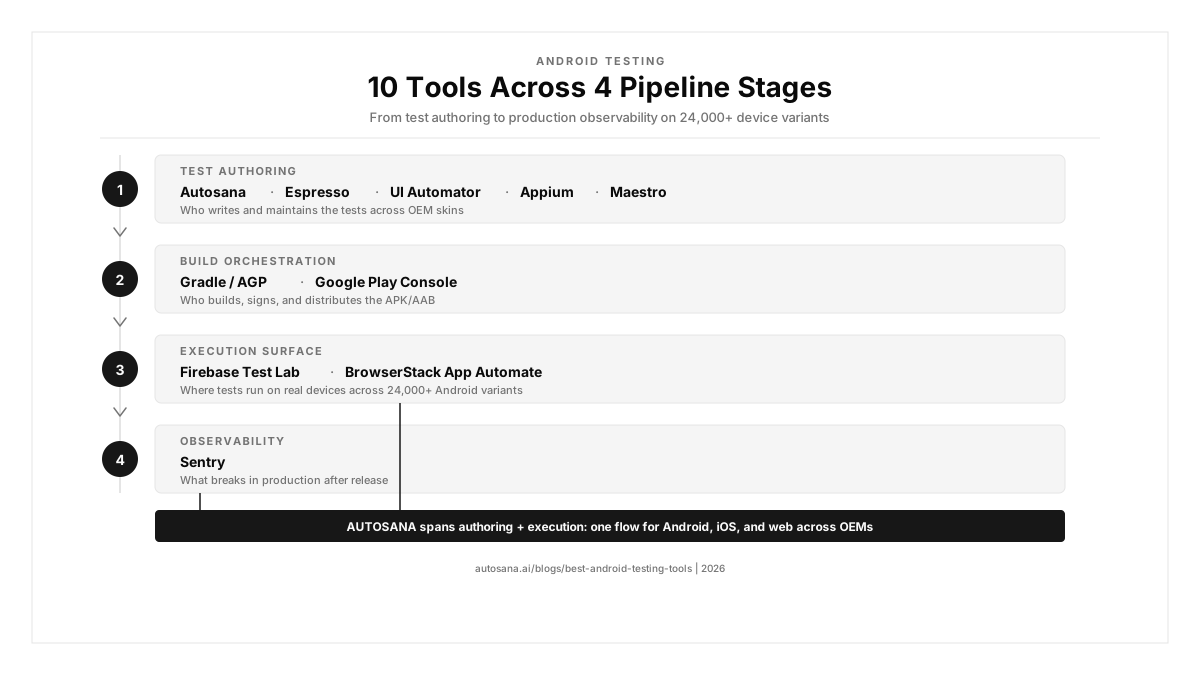
Most guides rank these tools in a flat list. That hides the fact that Espresso and Firebase Test Lab solve different problems. One writes tests. The other runs them. This guide sorts ten tools by the role they play in your Android testing pipeline, so you can pick the right tool for each job.
Key Takeaways
- Android testing requires tools across four pipeline roles: authoring (who writes the tests), build orchestration (who assembles and signs the APK/AAB), execution surface (where the tests run across 24,000+ device variants), and observability (what breaks in production).
- Espresso remains the fastest native Android test framework, but it only runs on Android and requires Kotlin or Java. The 2026 question is who writes the tests, not which framework.
- OEM fragmentation is the core Android testing challenge: Samsung's One UI, Xiaomi's HyperOS, OnePlus's OxygenOS, and stock Pixel Android all render the same app differently.
- Simulator-only testing misses real-device failures: OEM notification handling, biometric prompts on different hardware, battery optimisation behaviour, and custom permission dialogues.dialogs.
- Autosana generates intent-based Android test flows that self-heal when the UI changes, run on real devices across OEMs, and post session replay to every PR.
Which Android testing tools are teams using in 2026?
| Tool | Role | Best For | Pricing |
|---|---|---|---|
| Autosana | Test authoring (agent) | Teams wanting AI-authored Android flows that self-heal and cover iOS + web too | Contact for pricing |
| Espresso | Test authoring (native) | Android teams needing fast, in-process UI tests with Kotlin/Java | Free (Android SDK) |
| UI Automator | Test authoring (system) | Teams testing cross-app workflows, system UI, and notifications | Free (Android SDK) |
| Appium | Test authoring (cross-platform) | QA engineers needing one framework across Android and iOS | Free, open source |
| Maestro | Test authoring (simple) | Teams wanting YAML-based Android flows without coding | Free; paid cloud |
| Gradle / AGP | Build orchestration | Teams automating builds, signing, and test execution in CI | Free, open source |
| Google Play Console | Build orchestration | Teams distributing internal test tracks and staged rollouts | Free (Google) |
| Firebase Test Lab | Execution surface | Teams needing Google-hosted real Android devices for CI | Free tier; pay-per-use |
| BrowserStack App Automate | Execution surface | Enterprise teams needing real Android device coverage at scale | From $225/mo |
| Sentry | Observability | Teams tracking crashes, ANRs, and performance regressions in production | Free tier; paid plans |
Test authoring tools
These write and maintain the tests. The substrate underneath most Android UI tests is either Espresso (in-process, fast) or UI Automator (cross-app, system-level). The tools in this category differ in who writes the test, what language it uses, and how much maintenance you absorb when the UI changes across OEM skins.
Autosana: best for cross-platform Android E2E
What you get:
- Intent-based flows generated from plain-English descriptions, not view IDs or resource identifiers
- Runs natively on real Android devices, iPhones, and web from a single flow definition
- Self-heals when OEM skins change dialog layouts or system UI between builds
- Posts session replay to every PR via CI/CD integration
- Tests run on real devices across Samsung, Pixel, OnePlus, and Xiaomi hardware
Why teams pick it: A QA engineer on r/QualityAssurance described the shift from web to mobile testing: "mobile testing seems to take longer. Every sprint, same feature scope." A commenter broke down the debugging surface: failures from "app state, OS version, build type, device permission, Appium/WDA issue, cloud device slowness." On Android, multiply that by OEM fragmentation. Autosana absorbs that complexity. One flow definition handles Android, iOS, and web. When Samsung's One UI moves a permission dialog or Xiaomi's HyperOS changes notification handling, the agent re-anchors visually instead of failing on a stale resource ID.
The tradeoff: Does not replace Espresso for unit-level UI tests or white-box testing where you need access to internal app state. Does not run performance profiling, memory leak detection, or accessibility audits. For single-platform Android-only teams with a dedicated SDET who owns the Espresso suite, Espresso is simpler and costs nothing. The Gobi Maps case study shows where the agent layer pays off.
Espresso: best native Android framework
What you get:
- Google's first-party test framework with full Android Studio integration
- In-process execution with automatic synchronization, eliminating the need for sleep or wait calls
- Direct access to the app's view hierarchy for fast, deterministic assertions
- Kotlin and Java with complete access to Google's Espresso APIs
Why teams pick it: Espresso is what Google builds, maintains, and ships with the Android SDK. Tests run in the same process as the app, which makes them faster than any cross-process alternative. Automatic synchronization with the UI thread means fewer flaky tests compared to tools that poll for element visibility. A commenter on r/softwaretesting described the problem with developer-owned testing: "every test comes from that same mental model, so you are not really testing the software." Espresso is powerful but inherits this bias when developers write their own tests.
The tradeoff: Android only. No iOS, no web, no cross-platform. Kotlin or Java required. Tests break when view IDs change, custom views lack proper content descriptions, or Jetpack Compose introduces dynamic recomposition that shifts the semantics tree. The widget identification problem is well documented: tests fail when there are no unique properties to unambiguously identify specific widgets in the UI. Cloud execution requires a third-party lab.
Where Autosana fits in: Autosana adds iOS and web coverage alongside Espresso. Teams keep Espresso for fast, in-process Android UI tests and layer Autosana for cross-platform E2E regression testing that covers all three surfaces without view ID dependencies.
UI Automator: best for system-level testing
What you get:
- Google's cross-app testing framework for system UI, notifications, and multi-app workflows
- Black-box testing that works across app boundaries and system settings
- Access to device-level interactions: status bar, quick settings, system dialogs
- Runs on real devices and emulators through Android Testing docs
Why teams pick it: UI Automator tests what Espresso cannot: push notification handling, permission dialogs, system settings interactions, and workflows that span multiple apps. For testing how your app behaves when a phone call interrupts a checkout flow, or when the OS kills your background process, UI Automator is the only first-party option.
The tradeoff: Slower than Espresso because it runs cross-process. No access to the app's internal state. Tests are more brittle across Android versions and OEM skins because system UI elements vary between Samsung, Pixel, and Xiaomi devices. The same notification dialog test can pass on stock Android and fail on One UI.
Where Autosana fits in: Autosana handles cross-app and cross-platform flows without the OEM-specific brittleness of UI Automator. For teams testing notification-to-app transitions or multi-app workflows, Autosana's visual anchoring works across OEM skins where UI Automator's resource-ID approach breaks.
Appium: best for cross-platform mobile
What you get:
- Unified WebDriver API across Android and iOS with any programming language
- Uses UI Automator 2 under the hood (via UiAutomator2 driver) for Android automation
- Largest mobile automation plugin ecosystem
- Code-level control over native, hybrid, and mobile web interactions
Why teams pick it: Appium is the established standard for teams that need one framework across Android and iOS. Existing Selenium knowledge transfers directly through the WebDriver protocol. An engineer on r/QualityAssurance described using "copilot plus agent mode to analyze the tests, create conversion plans, then let that sucker fly" to migrate a large suite. Selenium-to-Appium is one of the smoother migration paths in mobile testing.
The tradeoff: Slow compared to running Espresso directly. Complex setup: correct Android SDK version, correct Appium configuration, correct UiAutomator2 driver build. Cloud-based Appium runs can take hours for modest suites. The UiAutomator2 driver adds a failure surface that native Espresso testing avoids. On r/softwaretesting, a practitioner noted that "our toolkit from 2020 looks roughly the same in 2026," pointing to Appium's stable but aging architecture.
Where Autosana fits in: Autosana removes the Appium configuration overhead for Android and iOS. No UiAutomator2 driver setup, no driver version management. Intent-based flows run on real devices without the infrastructure complexity that makes Appium setups fragile across CI environments.
Maestro: best for simple Android flows
What you get:
- YAML-based flow definitions that run on Android and iOS
- No programming required, minimal setup
- Built-in support for gestures, scrolling, and device interactions
- Maestro Cloud for CI execution
Why teams pick it: Maestro is the fastest path to a running Android test if you do not want to write Kotlin or configure Appium. You define flows in plain YAML, and Maestro handles the platform-specific execution. For teams converting manual mobile testing to automation without hiring SDETs, the low barrier matters.
The tradeoff: Simplicity becomes a limitation for complex test scenarios. No code-level control, limited assertion capabilities, and a smaller community than Appium. Does not support web testing. For enterprise-scale Android automation with custom logic across OEM skins, Espresso or Appium is the stronger choice.
Where Autosana fits in: For teams outgrowing Maestro's YAML simplicity, Autosana adds self-healing, web coverage, and CI/CD integration that Maestro does not have, without requiring the complexity of Appium or Kotlin.
Build orchestration.
These automate the build, sign, and distribute steps that sit between writing a test and running it on a device. Android's build system is more complex than iOS: multiple build variants, product flavors, ProGuard/R8 obfuscation, and split APKs add configuration surface that affects what gets tested.
Gradle / Android Gradle Plugin: best for build automation
What you get:
- Android's official build system with full control over build variants, flavors, and signing configs
- Runs Espresso and UI Automator tests as part of the build lifecycle
- Integrates with every major CI system (GitHub Actions, Jenkins, CircleCI, Bitrise)
- Manages dependencies, ProGuard/R8 shrinking, and APK/AAB generation
Why teams pick it: Gradle with the Android Gradle Plugin is not optional. Every Android app uses it. The question is how well you configure it. Properly set up, Gradle runs unit tests, instrumentation tests, lint checks, and produces signed builds in a single pipeline. It orchestrates what gets tested and how.
The tradeoff: Not a testing tool. Gradle orchestrates the build that tests run against but does not write or execute tests beyond invoking the test runner. Build configuration complexity scales with the number of flavors and build types. Large projects with multiple modules can see build times exceed 10 minutes, which slows CI feedback loops.
Where Autosana fits in: Gradle builds the app. Autosana tests it. The two complement each other in CI: Gradle handles the build pipeline and produces the APK/AAB, Autosana runs intent-based E2E flows against the signed build on real devices.
Google Play Console: best for internal test distribution
What you get:
- Internal testing tracks for distributing builds to team members instantly
- Closed and open testing tracks for beta distribution to external testers
- Staged rollouts with percentage-based release controls
- Pre-launch reports with automated compatibility testing across devices
Why teams pick it: Google Play Console is the only path to production on Android. Its internal testing track distributes builds to up to 100 team members without app review. Pre-launch reports run your app on a set of real devices automatically and flag crashes, accessibility issues, and security vulnerabilities before you promote to production.
The tradeoff: Pre-launch reports run a limited set of automated crawls, not your custom test suite. Internal testing requires Google accounts for every tester. The closed testing track requires review for the first release. For automated testing with custom flows, you need a separate tool.
Where Autosana fits in: Google Play Console distributes builds and collects pre-launch crash data. Autosana runs your actual E2E test flows against the same builds, catching the functional regressions that automated crawls miss.
Execution surface
These provide the real devices and infrastructure where tests actually run. The authoring tool writes the test. The execution surface determines whether it runs on a local emulator, a cloud-hosted Samsung Galaxy, or a lab of physical devices across OEMs.
Firebase Test Lab: best for Google-hosted Android devices
What you get:
- Runs Espresso, UI Automator, and Robo tests on physical Android devices in Google data centers
- Robo testing crawls your app automatically without writing test code
- Free daily quota (15 tests per day on Spark plan for physical devices)
- Integrates with GitHub Actions, Bitrise, and Gradle through gcloud CLI
Why teams pick it: Firebase Test Lab is the lowest-cost path to real Android device testing. The Robo test crawler provides baseline coverage with zero test code. For teams already using Firebase for analytics, crashlytics, or remote config, Test Lab is a natural addition. Google maintains the devices, including Pixel and Samsung models, so you avoid the operational cost of a physical lab.
The tradeoff: Device selection skews toward Pixel and Samsung. Fewer OEM variants than BrowserStack. Xiaomi, OnePlus, and Oppo devices may not be available or may lag behind current models. For teams shipping to markets where non-Samsung OEMs dominate (India, Southeast Asia), the device coverage gap matters.
Where Autosana fits in: Autosana runs on its own real device cloud with broader OEM coverage. For teams already using Firebase for other services, Autosana complements it by handling the E2E layer across OEMs that Firebase Test Lab may not cover.
BrowserStack App Automate: best for enterprise device coverage
What you get:
- Hundreds of real Android devices across Samsung, Pixel, OnePlus, Xiaomi, and more OEMs
- Parallel execution at enterprise scale
- Integrates with Appium, Espresso, and CI pipelines
- Video recordings, network logs, and device logs for every session
Why teams pick it: BrowserStack App Automate provides the widest real Android device coverage of any cloud lab. For enterprise teams that need to verify across Galaxy S24, Pixel 9, OnePlus 13, and Redmi Note 14, BrowserStack handles the OEM matrix. Real devices catch failures emulators miss: OEM-specific permission dialogs, manufacturer battery optimization killing background services, and custom notification channels. A DevOps engineer on r/devops described AI tooling that "planned and worked with hundreds of files, found what it needs to do, and did it first try." That scale of automated device coverage is what cloud labs enable.
The tradeoff: Expensive at scale. If your Android test suite is five scripts running on two devices, the cloud lab adds cost without proportional value. Build your tests on local emulators first, scale to a cloud lab when your OEM matrix exceeds what Android Studio can cover locally. LambdaTest and Kobiton offer alternatives at different price points. An engineer on r/QualityAssurance put it directly: "Slow automation is garbage. Flaky automation is garbage. Automation should prove your application works to requirements, quickly."
Where Autosana fits in: Autosana includes its own real device infrastructure for Android testing across OEMs. Teams that already use BrowserStack for other surfaces can continue using it. Teams that want one platform for authoring and execution use Autosana for both.
Observability
Sentry: best for Android crash and performance monitoring
What you get:
- Crash reporting with full stack traces, device context, and breadcrumbs
- ANR (Application Not Responding) detection with thread-level analysis
- Performance monitoring with transaction tracing across app screens
- Release health tracking with crash-free session rates per build
Why teams pick it: Sentry catches the issues that pre-release testing misses. A crash that only reproduces on a Samsung Galaxy A14 running Android 12 with 3GB RAM is invisible to your Espresso suite but visible in Sentry's crash feed. For teams investigating production ANRs on specific OEM and OS combinations, Sentry provides the device context that stack traces alone cannot. The release health dashboard shows whether a new build is regressing crash-free rates before a full rollout.
The tradeoff: Observability only. Does not run tests, generate test cases, or prevent bugs from shipping. For teams already using Firebase Crashlytics, adding Sentry creates duplicate reporting. Choose one crash reporting tool and commit to it.
Where Autosana fits in: Autosana catches regressions before they reach production. Sentry catches the issues that slip through. Autosana for pre-release testing across OEMs, Sentry for post-release monitoring. The two cover different phases of the quality lifecycle.
How do you pick the right Android testing tools?
The OEM fragmentation problem makes Android tool selection harder than iOS. A test suite that passes on Pixel emulators tells you nothing about Samsung's One UI notification rendering, Xiaomi's aggressive battery optimization, or OnePlus's custom permission flow. The combination of tools matters more than any individual tool.
Who writes the tests? If Android engineers own testing, Espresso gives the fastest feedback with direct view access. If QA engineers write tests without Kotlin expertise, Maestro's YAML or Appium's WebDriver API removes the language barrier. If nobody wants to own test maintenance, an agent (Autosana) handles authoring and self-healing across OEMs.
Do you ship Android only or also iOS and web? Android-only teams can build their entire stack on Espresso plus Gradle. Teams shipping all three platforms need either three separate testing stacks or an agent layer that writes one flow for all surfaces. When Airbnb migrated 3,500 test files, engineers on r/ExperiencedDevs estimated 1.5 years of manual work. Maintaining three platform-specific test suites multiplies that cost.
Where do tests run? Emulators for development feedback. Real devices for release validation across OEMs. Start on emulators for speed, and run critical flows on real Samsung, Pixel, and Xiaomi devices for confidence. Firebase Test Lab (free tier) or BrowserStack (enterprise scale) provides the execution surface.
Conclusion
Android testing is not one tool but four roles working together: authoring, build orchestration, execution surface, and observability. Espresso remains the fastest native framework. Gradle handles the build pipeline. Real devices across OEMs (Firebase Test Lab, BrowserStack, or Autosana's own cloud) handle execution. The OEM fragmentation problem makes real-device coverage non-negotiable. Pick by role, not by ranking.
.png)
FAQ
What is the best Android testing framework?
Espresso for native speed with Kotlin/Java. UI Automator for system-level and cross-app testing. Appium for cross-platform with iOS. Maestro for YAML-based simplicity. Autosana for AI-authored flows that self-heal across OEM skins and cover iOS and web.
Is Espresso better than Appium for Android?
Espresso is faster and more stable because it runs in-process with automatic synchronization. Appium adds a UiAutomator2 driver layer that introduces latency and setup complexity. Use Espresso for Android-only speed. Use Appium when you also need iOS from the same framework.
How do you handle Android device fragmentation in testing?
Test on real devices across OEMs, not just Pixel emulators. Use Firebase Test Lab or BrowserStack for device coverage. Focus on Samsung (40% market share), Pixel (stock Android), and at least one Xiaomi or OnePlus device for OEM skin coverage.
What is the best free Android testing tool?
Espresso is free with Android Studio. UI Automator is free in the Android SDK. Appium is free and open source. Firebase Test Lab offers a free daily quota for real device tests. Gradle is free and open source.
What is the difference between Espresso and UI Automator?
Espresso runs in-process with the app (white-box) for fast, stable UI tests. UI Automator runs cross-process (black-box) for system-level testing: notifications, permissions, multi-app workflows. Use Espresso for app-internal flows, UI Automator for system interactions.
Can AI write Android tests?
Yes. Autosana generates Android tests from plain-English descriptions. The generated tests still need human review to confirm assertions match business logic. AI accelerates authoring but does not replace test strategy.
How do you test Android apps on real devices in CI?
Use Firebase Test Lab, BrowserStack App Automate, or Autosana's real device cloud. Pair with Gradle to build and sign the APK/AAB, then run Espresso or Autosana flows against the signed build in CI via GitHub Actions, Jenkins, or Bitrise.
What is Android Robo testing?
Robo testing is Firebase Test Lab's automated crawler that explores your app without test code. It taps buttons, fills forms, and navigates screens, reporting crashes and screenshots. Useful for baseline coverage but does not replace intentional test flows for business-critical paths.