
Best QA Automation Testing Tools in 2026: 9 Reviewed by Use Case
Nine QA automation testing tools reviewed by use case: code-first web, AI-native E2E, API, mobile, and cloud infrastructure. Honest reviews from practitioners.
Yuvan Sundrani · 14 min read
autosana.ai
A team choosing between Playwright and Postman is not making the same decision as a team choosing between Playwright and Cypress. The first question is what you need to automate: web UI, APIs, mobile apps, or all three. This guide groups nine tools by the testing surface they cover, with honest reviews of each.
Key Takeaways
- The QA automation market exceeds $25 billion in 2026, but most teams need two or three tools from different categories rather than one tool that tries to cover everything.
- Playwright has replaced Selenium as the default for new web automation projects. Practitioners report faster setup, automatic waiting, and better error messages out of the box.
- 76 percent of QA professionals use AI-powered testing tools, but only 15 percent of organizations have enterprise-wide adoption. Most teams are still piloting.
- The tool matters less than the strategy. A team with 600 Selenium tests where only 10 pass has a strategy problem, not a tooling problem. Switching frameworks without fixing test architecture produces the same failure rate on a different platform.
- Autosana generates intent-based E2E flows across iOS, Android, and web that self-heal when the UI changes. No selectors to maintain.
Which QA automation testing tools are teams using in 2026?
| Tool | Category | Best For | Pricing |
|---|---|---|---|
| Autosana | AI-native E2E | Teams shipping iOS, Android, and web who want self-healing flows | Contact for pricing |
| Playwright | Code-first web | Teams starting new web automation who want speed and cross-browser support | Free, open source |
| Selenium | Code-first web | Enterprise teams with existing suites and multi-language requirements | Free, open source |
| Cypress | Code-first web | Frontend teams wanting fast feedback on JavaScript apps | Free tier; paid from $75/mo |
| Mabl | AI-native web | QA teams wanting codeless web automation with auto-healing | From ~$4,000/yr |
| testRigor | AI-native cross-platform | Non-technical teams writing plain-English tests | From $300/mo |
| Postman | API testing | Backend teams testing REST and GraphQL endpoints | Free tier; paid from $14/mo |
| Appium | Mobile automation | QA engineers needing open-source mobile automation on iOS and Android | Free, open source |
| BrowserStack | Cloud device lab | Enterprise teams needing real device and browser infrastructure at scale | From $225/mo |
Code-first web automation tools
1. Playwright: best for new web automation projects
Key features:
- Runs across Chromium, Firefox, and WebKit with native parallel execution
- Auto-waiting eliminates most timing-related flakiness without explicit sleeps
- Built-in trace viewer for stepping through actions, screenshots, and network requests after failures
- Supports TypeScript, JavaScript, Python, Java, and C#
Where it wins: A tester who switched from Selenium on r/softwaretesting described the experience: Playwright works out of the box without driver version management, finds elements more efficiently, waits automatically, and gives better error messages. A test automation instructor in the same thread noted: "Playwright is taking market shares from Selenium right now. More new projects will be Playwright." The trace viewer alone justifies the switch for many teams: you get a full timeline of actions, screenshots, network requests, and console logs for every failed test, which cuts debugging time significantly.
Where it falls short: Web browsers only. Experimental Android support is Chromium-only and cannot test native apps. For mobile coverage, pair with Appium or Autosana. Requires coding proficiency, so teams without SDETs face a steeper learning curve than codeless alternatives like Mabl or testRigor.
2. Selenium: best for large existing suites
Key features:
- Supports every major browser with Java, Python, C#, Ruby, and JavaScript bindings
- Largest ecosystem, community, and documentation of any automation framework
- New hires almost always have prior Selenium experience
- WebDriver BiDi specification may close the protocol gap with Playwright over time
Where it wins: A QA lead on r/QualityAssurance diagnosed a common failure: 600 Selenium tests where only 10 passed. The top comment: "You don't have 600 tests. You have 10 tests and 590 useless bits of code." The lesson: "Strategy is the problem, not technology." A tester on r/softwaretesting confirmed Selenium persists because "our toolkit from 2020 looks roughly the same in 2026." It works, and migration cost is real.
Where it falls short: Slow compared to Playwright. No auto-wait, no self-healing, no codeless option. For new projects, Playwright has replaced it. For existing suites with thousands of tests, migration cost keeps teams on Selenium. WebDriver BiDi is not production-ready yet.
3. Cypress: best for frontend JavaScript teams
Key features:
- Runs directly inside the browser with real-time test reloading
- Time-travel debugging through DOM snapshots
- Cypress Dashboard adds test analytics, flake detection, and parallelization
- Excellent developer experience for JavaScript-heavy SPAs
Where it wins: For frontend developers working on single-page applications, no other tool matches Cypress's developer experience. You see tests run live, step through failures visually, and time-travel through DOM snapshots. The tight integration with the browser runtime means Cypress catches issues that headless-only tools miss, like rendering glitches and animation-related timing bugs.
Where it falls short: No mobile support. Multi-tab and multi-origin flows require workarounds. Slower than Playwright for large parallel suites. For teams whose QA scope extends beyond the browser, Cypress covers only one layer of the stack.
AI-native E2E testing tools
4. Autosana: best for cross-platform E2E
Key features:
- Generates intent-based E2E flows from natural language, not selectors
- Runs natively on iOS, Android, and web from a single flow definition
- Self-heals when UI changes between builds instead of failing on stale selectors
- Posts session replay to every PR via CI/CD integration
- Runs on real devices in the cloud, catching device-specific regressions simulators miss
Where it wins: A commenter on r/softwaretesting described the problem with developer-owned testing: "When you build something, you have a mental model. Every test comes from that same mental model, so you are not really testing the software." Autosana's intent-based approach tests what the user does, not what the developer thinks the user does. When Airbnb needed to migrate 3,500 React test files, engineers on r/ExperiencedDevs estimated 1.5 years of manual work. That is the maintenance scale that accumulates when you maintain separate suites per platform. Autosana eliminates that multiplication with a single self-healing flow that covers all three surfaces.
5. Mabl: best codeless web automation
Key features:
- Browser-based test recorder with AI-stabilized locators
- Auto-healing when UI changes without human intervention
- Strong CI/CD integrations and built-in visual change detection
- Production-ready for web regression without writing code
Where it wins: A practitioner on r/QualityAssurance described AI in their workflow: it "saved me lots of time once I got good agents and codebase, I would say 50 percent." That time savings is where codeless AI tools earn their price over manual locator maintenance. Mabl's visual change detection also catches UI regressions that assertion-based tools miss, like shifted layouts or broken responsive designs.
Where it falls short: Web only. No native mobile support. Pricing starts around $4,000 per year, which prices out small teams. You trade version-control reviewability for ease of authoring. If your team needs mobile coverage, Mabl handles only the web layer.
6. testRigor: best for non-technical QA teams
Key features:
- Tests written in plain English across web, mobile, and API
- No selectors, no code, no page objects required
- QA analysts, product managers, and manual testers can author automated tests
- Cross-platform execution from a single test definition
Where it wins: Removes the coding barrier entirely. Teams without SDETs can build automation coverage without hiring engineering talent or learning a framework. Tests read like acceptance criteria, which means product managers and business analysts can review and contribute to test coverage directly.
Where it falls short: Plain-English tests are harder to debug on complex scenarios. Custom logic and conditional flows are limited compared to code-first tools. Starting at $300 per month, more expensive than open-source alternatives. ACCELQ and Functionize offer similar codeless approaches with different strengths.
API testing
7. Postman: best for API automation
Key features:
- Covers REST, GraphQL, SOAP, and WebSocket endpoints
- Visual interface for building and running requests
- Collections organize test suites; Newman CLI integrates into CI/CD
- Catches contract-breaking changes before they surface in the UI
Where it wins: API tests run in milliseconds, catch integration bugs early, and break far less often than UI tests. A practical QA stack inverts the testing pyramid: many API tests (Postman), some component tests, fewer E2E browser tests. The visual request builder makes Postman accessible to developers and QA engineers alike, and the collection-based organization scales from a handful of endpoints to thousands.
Where it falls short: API only. Cannot test user flows, visual rendering, or browser behavior. For API test generation from real traffic rather than manual authoring, Keploy is an open-source alternative. REST Assured and Pact handle contract testing for microservices.
Mobile automation
8. Appium: the best open-source mobile automation
Key features:
- Unified WebDriver API across iOS and Android
- Supports any programming language
- Largest third-party plugin ecosystem for mobile automation
- Code-level control over native app interactions on both platforms
Where it wins: The established standard for mobile test automation. Teams needing deep control over native iOS and Android interactions start here. The WebDriver protocol means existing Selenium knowledge transfers directly, and the plugin ecosystem covers everything from image recognition to gesture simulation.
Where it falls short: Slow compared to native frameworks (XCUITest for iOS, Espresso for Android). Complex setup: the right build, device/simulator, OS version, and Appium configuration are all required. Cloud runs can take hours for fewer than a hundred tests. For simpler mobile E2E, Maestro removes the complexity. For cross-platform, including web, Autosana or testRigor handles all three surfaces.
Cloud device infrastructure
9. BrowserStack: best device cloud at scale
Key features:
- 3,500+ real browsers, operating systems, and physical mobile devices
- Execution infrastructure that pairs with any testing tool
- Real devices catch failures simulators miss: camera, GPS, biometrics, push notifications
- Parallel execution at enterprise scale
Where it wins: When your device matrix exceeds what you can test locally, BrowserStack provides the infrastructure. Pair with Playwright for web, Appium for mobile, or Autosana for cross-platform E2E. Real device execution catches failures that simulators cannot reproduce: camera access, GPS behavior, biometric prompts, push notification handling, and memory pressure on lower-end devices.
Where it falls short: Charges for execution capacity. If your test suite is five scripts running on two devices, the cloud lab is unnecessary overhead. Build tests on local simulators first, then scale to a cloud lab when your device matrix exceeds what you can run locally. LambdaTest (from $15/mo) and Sauce Labs offer alternatives at different price points.
How do you pick the right QA automation tool?
Four questions narrow the field.
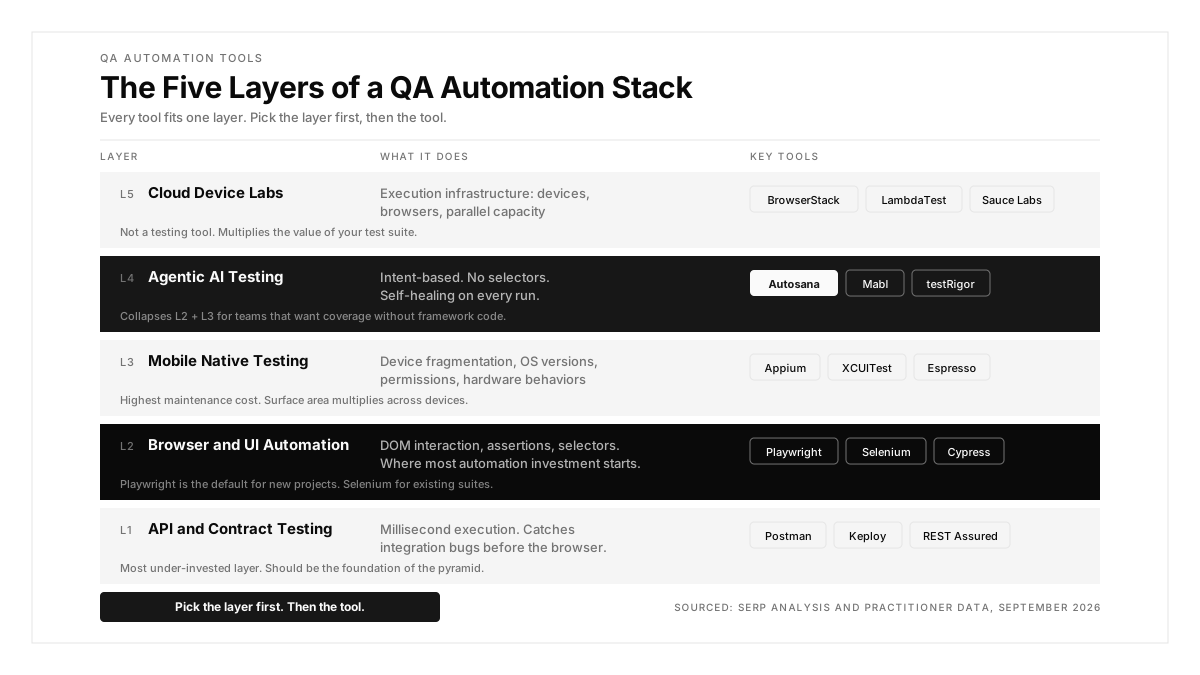
What are you testing? Web UI requires Playwright, Selenium, or Cypress. APIs require Postman or REST Assured. Native mobile requires Appium. Cross-platform E2E across iOS, Android, and web requires Autosana, testRigor, or a multi-tool stack. Matching the tool to the testing surface eliminates half the candidates immediately.
Who writes and maintains the tests? If SDETs own automation, Playwright or Selenium gives full control. If QA engineers do not code, testRigor's plain English or Mabl's recorder removes the barrier. If nobody wants to own test maintenance, self-healing tools (Autosana, Mabl) absorb the upkeep. An engineer on r/QualityAssurance described using "copilot + Claude 4 + agent mode to analyze the tests, create conversion plans, then let that sucker fly" to migrate a large suite. Twenty-plus-minute E2E regressions dropped to two-to-three-minute component tests.
What does your CI/CD pipeline need? Fast feedback requires parallel execution. A cloud lab (BrowserStack, LambdaTest) provides device coverage at scale. Regression testing on every PR requires direct git integration. A suite that takes 45 minutes per PR trains developers to ignore it regardless of which tool runs it.
What is your budget? Open-source frameworks (Playwright, Selenium, Appium) are free. AI-native platforms range from $300 per month (testRigor) to custom pricing (Autosana, Mabl). Cloud device labs start at $15 per month (LambdaTest) to $225 per month (BrowserStack). Enterprise platforms (Tricentis Tosca from custom pricing, TestComplete from $4,629/yr) add SAP, desktop, and mainframe coverage. Free tools require engineering time; paid tools trade license cost for maintenance reduction.
Conclusion
The best QA automation tool depends on what you are testing, who writes the tests, and how fast your CI needs results. Start with the testing surface: Playwright for web UI, Postman for APIs, Appium for native mobile, Autosana for cross-platform E2E. Do not pick a tool before picking the category it belongs to. A practical stack combines two or three tools from different categories rather than one tool that covers everything poorly.
.png)
FAQ
What is the best QA automation testing tool for beginners?
Playwright with TypeScript. Practitioners recommend it for the easiest setup, best documentation, and fastest time to a running test. Katalon is the alternative for teams that prefer a visual IDE over code.
Is Selenium still relevant in 2026?
Yes, for existing enterprise suites. Selenium supports more languages and has the largest ecosystem. New projects overwhelmingly choose Playwright, but migrating a stable Selenium suite is rarely worth the cost.
Can AI replace QA automation engineers?
Not for test strategy, coverage decisions, or debugging complex failures. AI accelerates test generation and maintenance. The Gobi Maps case study shows how teams use AI agents for regression while humans own strategy.
What is the difference between QA automation and QA testing tools?
QA automation tools run tests without human intervention (Playwright, Selenium, Autosana). QA testing tools include manual test management platforms (TestRail, Qase) that organize and track tests but do not execute them.
How much do QA automation tools cost?
Open-source frameworks (Playwright, Selenium, and Appium) are free. AI-native platforms range from $300/mo (testRigor) to custom pricing (Autosana, Mabl). Cloud device labs start at $15/mo (LambdaTest) to $225/mo (BrowserStack).
Which QA automation tool works best for mobile apps?
For native iOS, XCUITest. For native Android, Espresso. For cross-platform E2E across iOS, Android, and web, Autosana generates one intent-based flow for all three. Appium covers both platforms but requires more setup.
How do you measure ROI on QA automation?
Track escaped defect rate, test maintenance hours per sprint, release cycle time, and false failure rate. A declining escaped defect rate with stable maintenance hours indicates positive ROI.
Should QA automation run on every pull request?
Yes, for regression suites on critical flows. Manual testing should complement automation for exploratory work. Fast feedback on known flows during development, broader coverage before releases.